

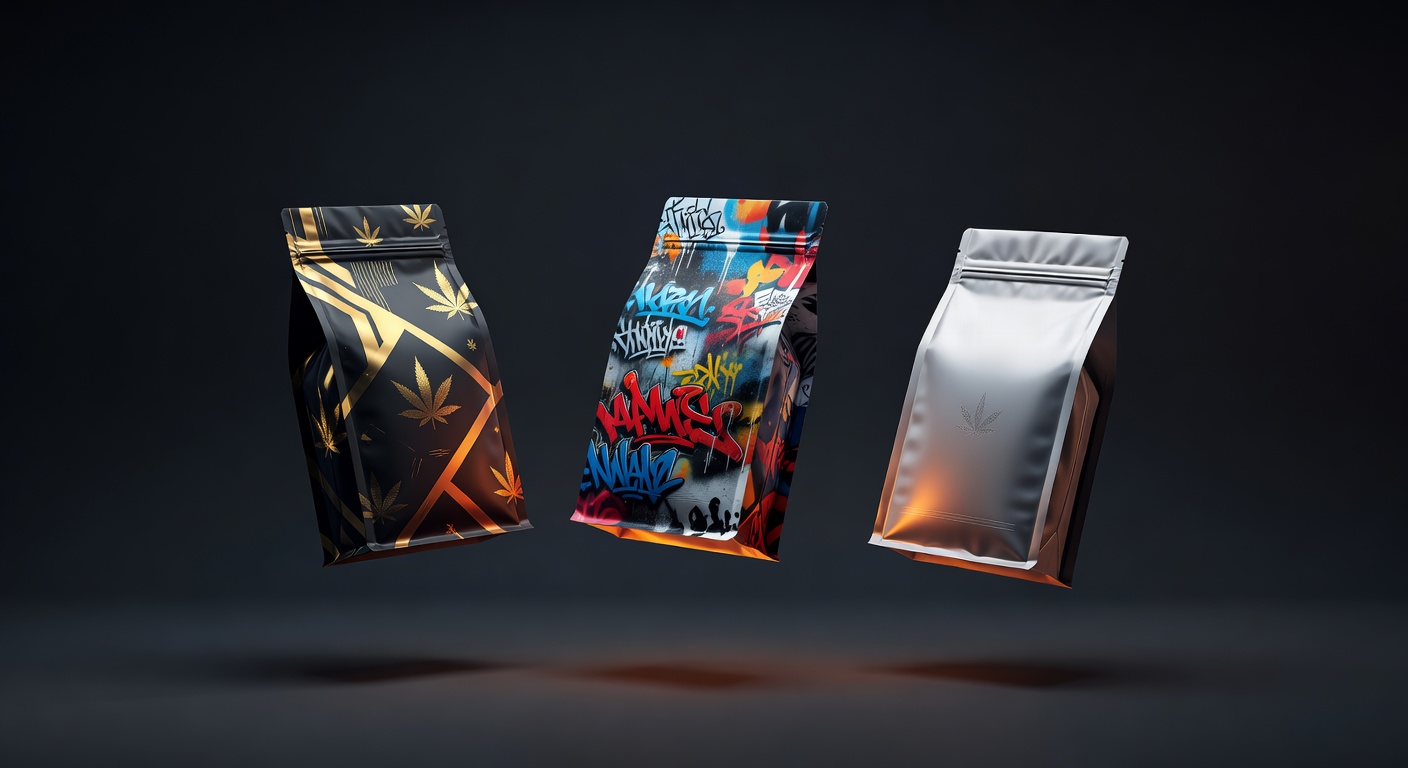
You have a brand name, a flavor profile, and an idea of how the bag should feel — and you need finished, print-ready packaging plus enough marketing assets to actually launch this thing. Traditionally that's a designer, a photographer, a video editor, a printer, and at least three weeks of back-and-forth. PackFlow collapses all of that into one 15-minute web flow. This is the complete, exhaustive guide to how it works, what every piece costs, and how to get the most out of it.
This is the pillar post — the one we wish existed when we were figuring out how to launch a custom mylar bag brand for the first time. If you only read one piece on PackFlow, read this one. Bookmark it, share it with your team, and use the table of contents below to jump to the section you need.
What You'll Learn
- What PackFlow is and who it's for
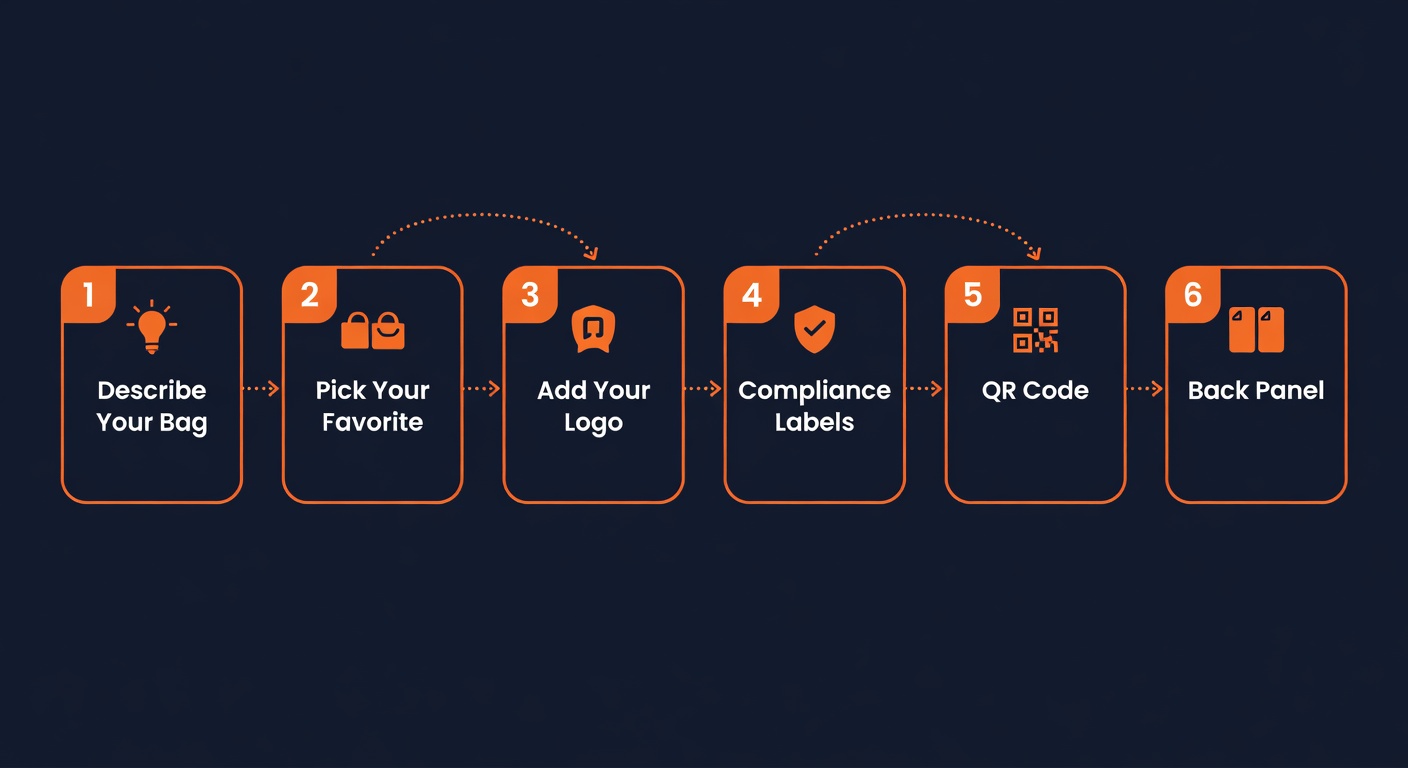
- The 6-step design flow, step by step
- Subscription tiers: Creator, Brand, and Agency explained
- À la carte options: per-bag designs and concept videos
- Promo Packages: your full marketing kit, auto-generated
- Print orders: production, shipping, and rush options
- The complete customer journey: from sign-up to first order
- Pro tips for getting the best results from PackFlow's AI
- Frequently asked questions
What Is PackFlow?
PackFlow is an AI-powered design and marketing-kit factory for custom cannabis mylar bags. You describe your brand in a few sentences. The AI generates print-ready bag artwork — front, back, logo, badges, QR code, and state-compliance overlays — and shows you a photorealistic mockup on a real bag before you pay a dollar.
If you love the result, you can pay $25 to download the print-ready files, subscribe for monthly credits, order printed bags directly, or buy a Promo Package that auto-generates a full marketing kit (lifestyle photos, 360° rotation videos, cinematic hero shots, social media templates) from your finished bag design.
Who PackFlow Is Built For
- Small and medium cannabis brands with 1–50 SKUs that need to launch new flavors fast.
- Brand hustlers who can't justify a $200–$800 designer for every test run.
- Solo growers and craft farmers stepping into retail for the first time.
- White-label operators launching multiple strains under one umbrella brand.
- Agencies serving multiple cannabis clients who need to produce volume work without scaling headcount.
What PackFlow Replaces
The honest version: PackFlow replaces three things that used to be three separate purchases.
- A custom packaging designer. Typical cost: $200–$800 per design, 1–2 weeks turnaround. PackFlow does it in under 60 seconds for $25 a la carte (or as low as ~$10/design on the Brand subscription).
- A product photographer. A launch shoot is typically $500–$2,000. PackFlow's Promo Packages auto-generate 16–60 marketing assets — lifestyle photos, macro detail shots, 360° rotations, cinematic videos — for $29–$99.
- A social media kit / launch package. Usually outsourced or stitched together manually. PackFlow ships ready-to-post Instagram story templates, square feed posts, carousel covers, and short-form videos with every Promo Package.
You're not paying three vendors. You're paying one tool that does all three.
The 6-Step Design Flow, Step by Step
This is the heart of PackFlow. Every bag goes through these six guided steps. The whole thing usually takes 5–10 minutes for a first-time user.
Step 1 — Describe Your Bag
You land on gopackflow.com/pages/design-your-bag-v2, pass a quick 21+ age gate, and start with your creative brief. Type your brand name, your product name, pick a style preset (exotic/tropical, street, luxury, minimal, psychedelic, etc.) or describe what you want in plain language.
Good prompt: "Dark background, gold foil accents, luxury cannabis vibe, brand name is Crown Royale, product is OG Kush — make it feel like a high-end whiskey bottle."
The AI generates 2 distinct label artwork concepts in about 30 seconds. You can pick one and continue, hit "remix" to generate two more variations of a concept you like, or go back and reroll with a new brief. This step is free — generate as many concepts as you want before you commit.
Step 2 — Pick Your Favorite and Refine
You've got two designs in front of you. Pick the one closer to your vision. From here you can:
- Keep it as is and move forward
- Edit with a follow-up prompt ("make the logo bigger," "more graffiti, less neon," "switch the color scheme to sunset orange and dark navy")
- Regenerate two more variations based on the one you picked
Most users iterate 2–3 times before they land on something they love. There's no penalty for iterating — the design is still free at this point.
Step 3 — Add Your Logo
This step is where you make the design unmistakably yours. You have two paths:
- Upload your existing logo (PNG or JPG). PackFlow automatically removes the background using advanced edge detection — no Photoshop required.
- Generate a logo with AI if you don't have one. Describe what you want and the AI creates a logo that matches your brand direction.
Then choose one of 6 placement positions:
- Top badge
- Corner left
- Corner right
- Bottom center
- Lower left
- Lower right
Pro tip: Use the highest-resolution logo you have. Cleaner edges = cleaner background removal = a sharper-looking final bag.
Step 4 — Compliance Labels and Info Panel
This is where PackFlow earns its keep for cannabis brands. Select your state from the dropdown and PackFlow automatically applies the correct state cannabis symbol at the proper size and position — no more hunting down PDF files from your state's regulatory website.
Then configure:
- Product weight (3.5g, 7g, 14g, 28g — the standard cannabis flower weights)
- Warning label style
- Info panel content (THC %, harvest date, batch number, etc.)
State symbols vary considerably — California, Michigan, Massachusetts, Colorado, and Oregon all have different mark requirements, sizes, and placement rules. PackFlow handles this for you.
Step 5 — QR Code (Optional)
Add a QR code that links to anything: your website, your Leafly listing, your Instagram, your COA (Certificate of Analysis) document, or your lab results. Enter a URL, pick a placement, and PackFlow embeds a scannable QR code directly into your label design.
QR codes are increasingly important for compliance — many states now require a scannable link to lab results, and a permanent QR code on the bag is the cleanest way to satisfy that rule without reprinting every batch.
Step 6 — Back Panel (Optional, If You Want Front + Back)
If you're going front + back (recommended for retail), Step 6 generates your back panel. PackFlow gives you four options auto-generated from your front design:
- Faded Front — your front artwork repeated at low opacity
- Soft Blurred — a soft-blurred version for a premium, atmospheric feel
- AI Thematic Continuation — the AI generates a new back panel inspired by your front's themes and colors
- Abstract Distillation — the AI distills the key visual elements of your front into a scattered, decorative pattern
Or upload your own back-panel artwork instead. Either way, this is the last creative step before the final mockup.
The Final Mockup + Pay (Step 7)
Before you pay anything, PackFlow shows your completed design placed on a real mylar bag mockup — black bag, white bag, or both, front and back. Watermarked, but otherwise final. This is your last check before you commit.
From here, your options are:
- Download the print-ready files ($25 a la carte, or use a subscription credit)
- Buy a Promo Package ($29/$59/$99) for a full marketing kit
- Order printed bags ($59.99 for 32 bags up to $179.99 for 128 bags)
- Save the bag to your account dashboard and come back later
Subscription Tiers: Creator, Brand, and Agency
If you're going to design more than one bag in a month, the subscription math beats à la carte every time. Here's how the three tiers compare:
Creator — $29/month
- 3 bag designs per month
- Saved logo library
- Prompt history (regenerate any past design with the same prompt)
- Watermark-free downloads
- Customer dashboard with saved bags + redownload access
- 30% off Promo Package purchases
- Cancel anytime — no contract
Best for: Hustlers and small brands launching 1–3 new SKUs per month.
Brand — $79/month
- 10 bag designs per month
- Everything in Creator, plus:
- Free Starter Promo Package automatically generated every time you Save a Bag — 16 marketing assets per bag, no extra charge
- 30% off Promo Package upgrades (Standard or Pro)
Best for: Established brands launching 5–10 SKUs per month with active social campaigns. The free Starter Promo Package on every save is the killer feature — that's 16 marketing assets per bag at no incremental cost.
Agency — $199/month
- Unlimited bag designs
- Everything in Brand, plus:
- 50% off Promo Package upgrades (the highest discount tier)
- Built for high-volume design work
Best for: Agencies and white-label operators producing dozens of bags per month for multiple clients.
How Plan Changes Work
You can upgrade, downgrade, or resubscribe at any time. When you change plans, you pay the new tier's price up front, your old contract is cancelled, and your new contract starts immediately with fresh credits at the new tier's allotment. There's no proration math to chase — you just pay for the tier you want.
Unused credits don't carry over between cycles — each month resets to your full tier allotment. Brand customers always start the month with a full 10 credits, not 10 + leftover.
See full subscription details and current pricing at gopackflow.com/pages/pricing.
À La Carte Options
Don't want a subscription? Three a la carte paths work without one.
Per-Bag Download — $25
Pay $25 for a single bag design download. You get the watermark-free print-ready PNG files (front-only or front + back) on the spot. Free regeneration within 24 hours if you want to tweak the design.
Concept Videos — $29
PackFlow's à la carte concepts page drops your bag design into a cinematic scenario — a boxing-ring knockout, a glass-shatter reveal, a sci-fi liquid splash, a vintage cathode-ray TV. Fresh concepts every week. $29 per concept video.
Print Orders
Order professionally printed mylar bags directly from PackFlow. See the print orders section below for full pricing and timing details.
Promo Packages: Your Full Marketing Kit, Auto-Generated
This is the part nobody else does. After you design your bag, PackFlow can auto-generate a complete marketing kit — lifestyle photos, macro detail shots, animations, cinematic videos, and social media templates — all built around your finished bag design and ready to upload to Instagram, TikTok, your website, or your dispensary listings.
Three Promo Package tiers, three different intensity levels:
Starter — $29 — 16 Assets, Ready in ~3 Minutes
- 11 lifestyle photos from PackFlow's curated library (your bag composited into real photo scenes — desks, hands, dispensaries, lifestyle)
- 1 macro detail shot (high-resolution print close-up)
- 1 360° rotation animation (8-second loop, perfect for product page sliders)
- 1 "Now Available" social story template (1080×1920, ready for Instagram Stories)
- 2 short videos: Bag Flip + Bring to Life
Best for: First launches, low-budget tests, or anyone who just needs a social-ready handful of assets fast.
Standard — $59 — 32 Assets, Ready in ~8 Minutes
- 21 lifestyle photos from the curated library
- 2 macro detail shots (print + edge close-up)
- 360° Rotation + Logo Reveal animations (8 seconds each)
- 3 social templates: Now Available, Coming Soon, Square Feed
- 4 cinematic videos: Bag Flip, Bring to Life, Fragmented, Grow from Light
Best for: Brands running active Instagram/TikTok with weekly posts. Enough variety to drip-feed content for 4–6 weeks.
Pro — $99 — 60 Assets, Ready in 10–12 Minutes
- 41 lifestyle photos from the curated library
- 3 macro detail shots (print, edge, logo close-up)
- 360° Rotation, Logo Reveal + Drop Reveal animations (8 seconds each)
- 5 social templates: Now Available, Coming Soon, Restock, Square Feed, Carousel Cover
- 8 cinematic videos — including a Veo-generated Hero Shot with audio (this is the showpiece — full ad-quality cinematic video built from your bag design)
Best for: Major launches, paid ad campaigns, dispensary onboarding decks, or any brand that wants 2+ months of social content in one purchase.
Promo Package Discounts for Subscribers
- Creator: 30% off any Promo Package
- Brand: FREE Starter Promo Package on every Save Bag, plus 30% off Standard and Pro upgrades
- Agency: FREE Starter on Save, plus 50% off Standard and Pro upgrades
Browse the full Promo Package catalog and see live examples at gopackflow.com/pages/promotions.
Print Orders: Production, Shipping, and Rush
If you want physical printed bags shipped to your door, PackFlow handles the print fulfillment in the same checkout. No second vendor, no plate-setup fees, no minimum orders that don't make sense for a test launch.
Print Pricing
- 32 bags, front only — $59.99
- 32 bags, front + back — $79.99
- 128 bags, front only — $119.99
- 128 bags, front + back — $179.99
Production Times
- Standard production: 7–10 business days
- Rush production: 3–5 business days (add Rush option at checkout)
- Saturday and Sunday don't count toward production days
Shipping
- Free Ground shipping on orders $150+
- USPS or UPS at checkout (Ground, 3-Day, 2-Day, Next Day Air)
- Bags ship flat-sealed, ready to fill
The Complete Customer Journey: Sign-Up to First Order
Here's what a typical first-time PackFlow journey looks like, end to end:
- Land on the home page. See the hero, see example bags, see the Promo Package teaser. Click "Design Your Bag."
- Pass the 21+ age gate. Required for cannabis-related content.
- Step 1 — describe your bag. Type your brand and vibe. 30 seconds later, 2 design concepts appear.
- Steps 2–6. Pick a favorite, add a logo, add compliance overlays, add a QR code, generate a back panel. Total: 5–10 minutes.
- Step 7 — see the watermarked mockup. Decide: pay-as-you-go, subscribe, buy a Promo Package, order prints, or save and come back.
- Pay and unlock. Watermark removed. Files generated. Promo Package starts rendering if you bought one (3–12 min depending on tier).
- Receive your assets. Print-ready files in your dashboard immediately. Promo Package delivery email when it's ready. Printed bags ship in 7–10 business days (or 3–5 with Rush).
- Re-download anytime. Saved bags live in your account dashboard. Re-download from any device, forever, as long as you've earned the save.
Pro Tips for Getting the Best Results
PackFlow's AI is good, but it's better with a sharp prompt and an experienced operator. Here's what we've learned from designing thousands of bags.
Be Specific in Your Brief
Bad: "Nice cannabis bag for OG Kush."
Good: "Dark navy background with gold foil holographic accents, luxury Indica vibe, brand name CROWN ROYALE in bold serif, product is OG Kush 3.5g, premium dispensary shelf appeal — think Macallan whisky meets street-art."
The AI takes every adjective seriously. Pile them on. Mention reference brands. Mention textures. Mention the emotion you want the customer to feel when they pick up the bag.
Use High-Resolution Logos
If you're uploading a logo, the higher the resolution the better. PackFlow's edge-detection background removal does well on 500×500 minimum, and great on 1500×1500+. Logos pulled from low-res Instagram screenshots will have soft edges and visible artifacts.
Generate Multiple Concepts Before You Commit
Don't stop at the first design you see. Generate 2–3 brief variants, pick your favorite, then regenerate one more time on your favorite to see if it gets better. The total cost of this iteration is zero — designing is free.
Front + Back > Front-Only for Retail
If you're selling at dispensaries or any in-person retail, spend the extra to do front + back. The back panel is where you put compliance info, ingredients, batch numbers, your brand story — and a customer who picks the bag up off the shelf will absolutely flip it over. A blank back screams "amateur"; a polished back screams "real brand."
Check State Compliance Before Finalizing
State cannabis symbol rules change. PackFlow tries to keep the library current, but always double-check that the symbol on your bag matches your state's most recent regulatory specification before you place a print order. Symbols, warning language, and sizing all vary by state.
Subscribers: Save Bag Immediately
If you're on the Brand or Agency tier, every Save Bag automatically generates a free Starter Promo Package — that's 16 marketing assets per bag at no extra cost. Don't leave them on the table. Save every bag you might want to launch, even speculative ones — the Starter Package is free for you.
Buy Promo Packages at Step 7, Not Later
Promo Packages are cheaper when bundled at Step 7 because subscribers get their monthly credit refunded if they buy the package at the same checkout. Adding it later as a separate transaction loses that discount. Plan your launch in one go: design + Promo Package + prints, all in one cart.
Frequently Asked Questions
Is PackFlow really free to use?
Yes. Designing is completely free — no signup wall, no credit card required. You can go through the entire 6-step flow, see your design on a real bag mockup, and only pay when you want a watermark-free download, a Promo Package, or printed bags.
Do I need a Shopify or e-commerce account to use PackFlow?
No. PackFlow runs entirely in your browser. You only create an account when you decide to purchase or save a bag — and even then, sign-up is one click with Shop Pay or email.
How long does it take to design a bag?
Most users finish a complete bag design (Steps 1–6 + final mockup) in 5–10 minutes. The AI generation for each step takes 30–60 seconds.
Can I edit my design after I save it?
Your saved bag stays exactly as you saved it in your dashboard — re-downloadable forever. To create a variation, start a new design (subscribers can use a credit; à la carte customers pay $25). The "remix" feature within a single session lets you iterate freely without committing.
What file formats do I get when I download?
Print-ready PNG files at full resolution — sized to PackFlow's print partner specs (front and back, where applicable). Suitable for any commercial print job, not just PackFlow's print service.
Can I use my own existing design instead of generating with AI?
The AI flow is the core of PackFlow — but you can upload your own logo at Step 3 and your own back-panel artwork at Step 6. The front panel currently goes through the AI generation step.
What if I don't love any of the AI-generated designs?
Regenerate as many times as you want — every generation while designing is free. Iterate the brief (more specific adjectives, reference brands, different style preset). Most users land on a design they love within 3–5 generations.
Do you handle international shipping for printed bags?
PackFlow ships within the US via USPS and UPS. For international orders, contact hello@gopackflow.com for a custom quote.
What about cannabis compliance — does PackFlow guarantee my design is legal?
PackFlow applies state symbols, weight info, and warning labels based on the state you select. Final compliance responsibility is on you — laws change, your specific product may have unique requirements, and we always recommend a final review with your state-specific compliance counsel before printing. PackFlow makes compliance easier; it doesn't replace your legal review.
Can my whole team use one PackFlow account?
Subscriptions are per-account. For agencies serving multiple clients, the Agency tier ($199/month) is the most cost-effective option — unlimited designs, no per-bag cap. Team seat features for shared dashboards are on the roadmap.
Ready to Design Your First Bag?
This guide covers everything PackFlow does, but the fastest way to understand it is to try it. Designing is free, takes 5–10 minutes, and shows you a real bag mockup before you pay a dollar.
Questions? Email hello@gopackflow.com or check out the rest of the PackFlow Packaging Guide for deeper dives on specific topics — compliance, sizes, design styles that sell, and how to start a mylar bag business in 2026.
0 comments